Remotely Control Security Robots over the Internet
In robotics, the Robot Operating System (ROS) offers software libraries and tools that help developers connect motors, sensors, and other software, speeding up the development of advanced robots.
However, ROS nodes in robots communicate with each other via TCP/UDP sockets, which are not accessible outside the robot’s LAN. Rosbridge WebSocket is a communication interface that enables non-ROS applications, such as web or mobile apps, to interact with a ROS system over a WebSocket connection through standard HTTP.
To use the robot as a security robot, I need to be able to interact with it over the internet while I’m away. How can I do that securely?
In my previous post, Live Video Streaming of Security Robots, I explained how to stream video from the robot over the internet securely. In this article, I will discuss how to control the robot over the internet securely.
Architecture
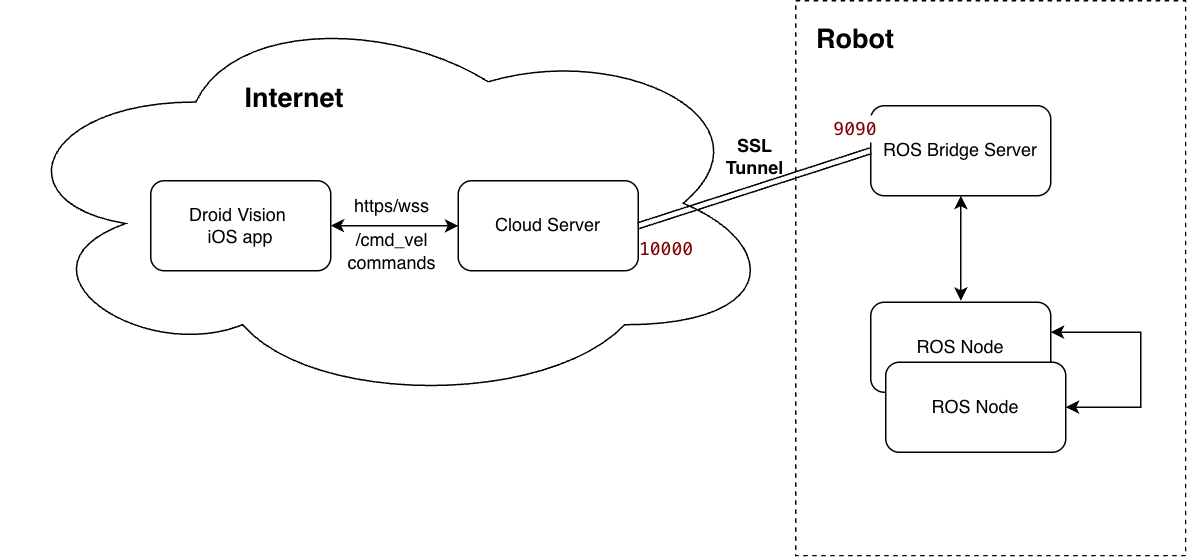
There are three components involved in the project. In the following sections, we will provide a detailed explanation of what they are and why they are needed:
- The robot, where the ROS framework and ROS bridge operate.
- The cloud server, which acts as an SSH Tunnel to relay WebSocket messages from the mobile app to the robot.
- The mobile app, such as Droid Vision with built-in Joystick and Keypad, connects to the cloud server
wss://cloud-server-domain.com/rosbridge/and sends ROS commands in JSON format.
The Robot
Robot Operating System (ROS) runs entirely on the robot
- The robot exposes ROS2 topics, such as /cmd_vel, /odom, and sensors topics, on the robot’s LAN. For details on running ROS2 on a physical robot, please see my article ROS 2 Control, Robot Control the Right Way
ros2 launch my_bot robot.launch.py - The robot launches the ROS bridge server to accept ROS commands via HTTP requests
ros2 launch rosbridge_server rosbridge_websocket_launch.xml
At this point, if I expose the robot’s IP address, I can control it from the iOS app through the websocket URL: ws://robot-ip-address:9090. However, I am not comfortable making my robot’s IP address public.
After exploring various options, I chose the “Reverse SSH Tunnel” method. It is similar to a Cloudflare tunnel but is self-hosted on a cloud compute instance. Since I already use a cloud instance as the media relay server for video streaming (Live Video Streaming of Security Robots), this approach fits well with my robot’s deployment architecture.
Here is the command I run on the robot to create a reverse SSH tunnel that opens an outbound WebSocket connection to the cloud server.
ssh -N -R 10000:localhost:9090 user@cloud-server-ip
Explanation of the argument -R 10000:localhost:9090:
- “-R” is reverse port forwarding. This means we open port 10000 on the cloud server and forward all traffic to port 9090 on the robot.
- “localhost” refers to the robot where this “ssh” command runs.
- The rosbridge only listens locally on port 9090 on the robot. It is not accessible from the outside.
The SSH tunnel disappears if the robot reboots or the network drops. Therefore, I have a stream_control.py program that dynamically opens and closes the tunnel based on whether the user goes live on the robot.
Cloud Server
The cloud server here functions solely as a relay and is not a ROS node. For simplicity, there is no ROS component on the cloud server.
Once the Reverse SSH Tunnel is established on the robot, any traffic on the cloud server’s port 10000 is automatically forwarded to the robot’s rosbridge.
However, there are two issues:
- the WebSocket traffic isn’t encrypted
- the firewall rule for the cloud instance includes ingress on port 10000.
To improve security, I will use Nginx to terminate the TLS WebSocket connection and upgrade/forward the WebSocket frames to the rosbridge tunnel at port 10000.
Here is the corresponding Nginx configuration:
server {
    listen 443 ssl;
    server_name cloud-server-domain.com;

    # SSL cert paths
    ssl_certificate ...
    ssl_certificate_key ...

    location /rosbridge/ {
        proxy_pass http://127.0.0.1:10000/;

        proxy_http_version 1.1;
        proxy_set_header Upgrade $http_upgrade;
        proxy_set_header Connection "upgrade";

        proxy_set_header Host $host;
        proxy_set_header X-Real-IP $remote_addr;
        proxy_set_header X-Forwarded-For $proxy_add_x_forwarded_for;

        # prevents 101 switching errors
        proxy_read_timeout 3600;
        proxy_send_timeout 3600;
    }
}
This simple configuration encrypts WebSocket traffic over the internet, with only the standard HTTPS port open on the cloud server. Messages to the URL “/cloud-server-domain.com/rosbridge” are forwarded to port 10000, which automatically tunnels to the robot’s ROS Bridge at port 9090.
Droid Vision iOS app
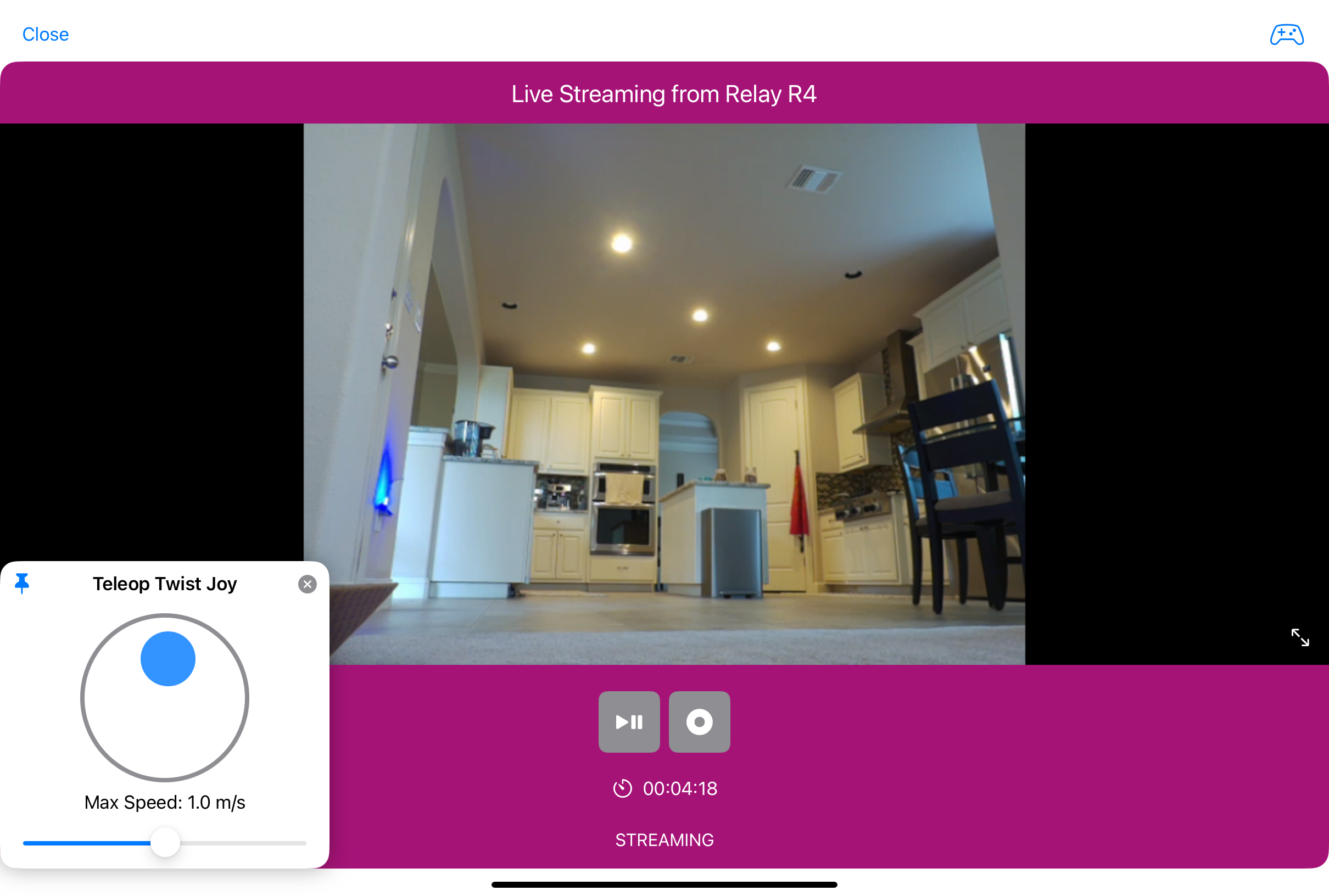
Now, the iOS app can connect to wss://cloud-server-domain.com/rosbridge to send commands to the “/cmd_vel” topic, which the robot uses to control its driving speed and direction.
Conclusion
This approach is highly secure because:
- The robot is never exposed to the internet.
- SSH encryption secures the tunnel and WebSocket connection.
- Only HTTPS port 443 is open on the cloud server.
- The cloud relay can restrict what the user can do to the robot.
Here is a quick summary of what each component does:
Robot
- Runs ROS2
- Runs rosbridge on port 9090 locally
- Opens an SSH reverse tunnel between the robot and the remote cloud server.
Cloud Server
- The cloud server functions solely as a pass-through, not as a ROS node. It relays messages to the robot via the SSH tunnel.
- It provides a secure WebSocket connection for the mobile app.
iOS app
- Sends ROS commands to the robot by invoking the secure cloud server URL.